Controls the case, invitations, helper review, reports, and contributor viewing.
Privacy in plain language
How TAYLOR protects a file.
The original stays in private encrypted storage. A one-way SHA-256 fingerprint helps show whether those exact bytes changed later.
Private file
Encrypted and access-controlled
The whole workspace
From a private case to a useful report.
TAYLOR keeps the survivor or case owner in control while trusted people contribute specific kinds of help.
- 01Create a private case
Use a codename and a brief factual summary. A temporary workspace can be started without an account and claimed before it expires.
- 02Preserve and organize
Add original files, public-source URLs, dates, factual notes, and returned court or agency records.
- 03Invite someone you trust
A unique contribution link lets a friend upload evidence. Case viewing remains off unless the owner explicitly enables it.
- 04Ask an approved helper
The owner may submit the case for review. One assigned
taylor_helpercan collaborate inside the private workspace. - 05Share a controlled report
The owner can create a temporary report link containing the case timeline, source notes, fingerprints, and file thumbnails.
Access follows a role
Not everyone sees the same thing.
Access is based on the signed-in account, case assignment, owner choices, and whether a private link is still active.
Uploads through a unique link. They see the case only when the owner separately allows it.
Works only on a case assigned to their approved taylor_helper account.
An owner or assigned helper sees the anchor button only when also in taylor_wallet.
Feature permissions
TAYLOR groups unlock different tools.
An account can belong to more than one group. These permissions add features, but they do not automatically reveal a private case.
Case review and collaboration
Can review consented case submissions, work on assigned cases, collaborate with helpers, and review community submissions.
Does not make someone law enforcement, an attorney, or an emergency responder.Restricted PublicData.com search
Unlocks the limited name-search test. Each provider request is counted and audited without storing the searched name or returned records.
Requires a lawful case-related purpose. Results may be inaccurate and must be verified.Supporting member features
Unlocks the Member tools page and member recognition features, including guided public Instagram search.
Membership does not grant helper status or access to anyone’s case.BSV wallet and evidence anchors
Shows the wallet page, balance, and receive address. An eligible case owner or assigned helper can anchor an evidence fingerprint.
The file and case details remain private and off-chain.Internal utility tokens
Shows configured token balances and eligible token actions inside the wallet page.
These database records are not BSV, money, investments, or case-access rights.Groups combine; case consent stays separate.For example,
taylor_helper + taylor_publicdata permits helper work and the restricted search, but the helper still sees only a case that was submitted and assigned to them.The upload journey
One file. Four careful steps.
- 01You choose a file
Keep the original image, video, or document whenever possible.
- 02TAYLOR fingerprints it
SHA-256 turns the file’s exact bytes into a 64-character fingerprint.
- 03TAYLOR encrypts it
Each case has its own random file-encryption key. The stored file uses authenticated AES-256-GCM encryption.
- 04Authorized access only
The file is kept outside the public web directory and delivered only after an access check.
Inside a case
Different material stays connected.
Encrypted screenshots, photos, videos, and documents with dates, labels, notes, and SHA-256 fingerprints.
URLs and observations from lawfully accessible public pages. The source is logged without bypassing privacy controls.
Plan FOIA, court, police, dispatch, and other requests; track their status; then attach encrypted responses by record type.
Owners and assigned helpers keep factual collaboration notes alongside the preserved material.
SHA-256 made simple
A fingerprint for the file—not its contents.
SHA-256 reads the file and produces a fixed-length value. It is designed as a one-way calculation: the fingerprint does not reveal the photo, video, or document.
Even a tiny change produces a very different result. Later, TAYLOR can calculate the fingerprint again and compare it with the saved value.
3a7bd3e2360a…f2f291c0e7a1423b…8d41What a match means: the compared files contain the same bytes. It does not prove who created the file, whether the content is true, or what happened outside the file.
Not a public media folder
Why a stranger cannot browse to your upload.
- The encrypted file is stored outside the public web directory.
- A download request must pass TAYLOR’s case-access rules.
- The application decrypts the file only for an authorized download.
- The case key is itself wrapped through the BRC-100 wallet interface and is never stored in plaintext.
- Private downloads use no-store instructions so browsers and intermediaries are told not to cache them.
What BRC-100 does here
TAYLOR uses the BSV Association’s BRC-100 wallet interface ↗ and its BRC-2 encryption method to wrap the random case key. This key-wrapping step is local wallet cryptography; it does not publish the key or file to the blockchain.
Who may be authorized?
The case owner, the helper assigned to an actively shared case, and—only if the owner allows it—a trusted contributor. A private report link can also expose selected case material to anyone holding that link until it expires or is revoked.
Inside the encrypted vault
Two layers protect each TAYLOR2 file.
The evidence file and its encryption key are protected separately. This lets TAYLOR destroy one case key without changing the keys used by every other case.
AES-256-GCMEncrypts the file with a random 256-bit key created only for that case.
Fresh nonceEvery encrypted file receives a new 96-bit nonce so the same content does not produce the same encrypted bytes.
Authentication tagGCM detects an altered file or header and refuses to decrypt it instead of returning untrusted bytes.
BRC-100 key wrappingThe case key is encrypted through the wallet interface using the BRC-2 encryption method. The plaintext case key is not saved in the database.Read the official BRC-100 specification ↗ · Read the official BRC-2 specification ↗
Original fileAuthorized upload
AES-256-GCMCase key + fresh nonce
TAYLOR2 vaultCiphertext + authenticated header
Wrapped case keyBRC-100 / BRC-2 interface
What is stored?
The private vault stores the encrypted file, its versioned TAYLOR2 header, nonce, and authentication data. The database stores only the wrapped form of the case key. None of these items are placed on the blockchain by this encryption process.
The BSV standards behind the wrapped key
These standards work together inside the wallet operation. They do not place the file or key on-chain.
- BRC-100 ↗ defines the wallet-to-application interface TAYLOR calls.
- BRC-2 ↗ defines the wallet encryption and decryption operation used to wrap the case key.
- BRC-42 ↗ defines the key-derivation scheme used underneath that wallet operation.
- BRC-43 ↗ separates the operation with a security level, protocol ID, case-specific key ID, and counterparty.
TAYLOR currently uses security level 2, protocol ID TAYLOR case key wrapping, a case-specific key ID, and counterparty self.
What happens during deletion?
TAYLOR first destroys the wrapped case key and then removes the live case records and encrypted files. Without that key, remaining TAYLOR2 ciphertext in a storage backup cannot be decrypted through TAYLOR. This cannot erase plaintext copies that someone previously downloaded, screenshots, browser history, or copies held outside the service.
Privacy-preserving proof
Encrypted evidence is not blockchain data.
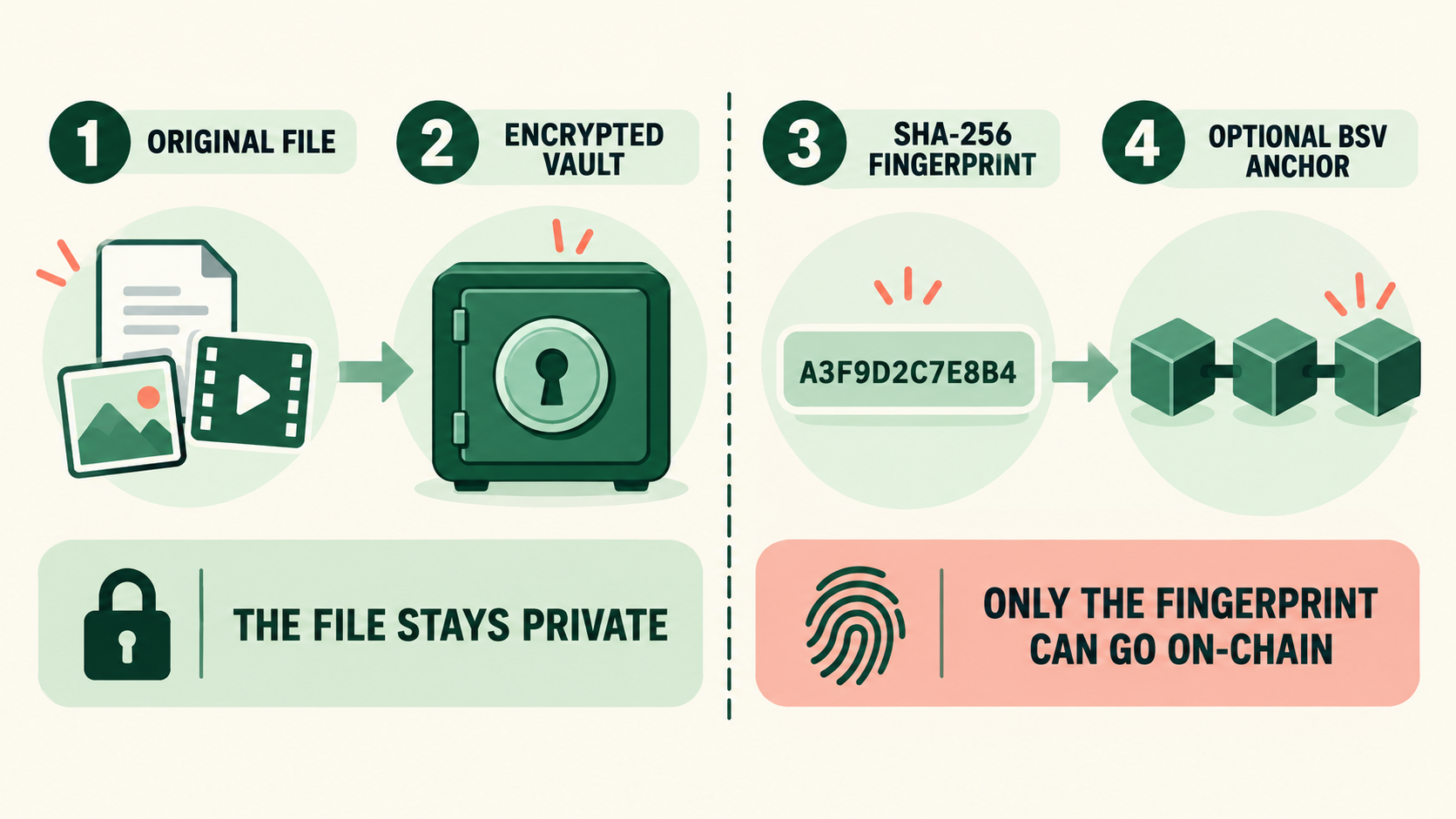
TAYLOR encrypts the original file in the private evidence vault and calculates a SHA-256 fingerprint—a fixed-length value that changes if the file changes.
An optional BSV anchor can publish that fingerprint as a timestamped integrity reference. The image, video, document, case details, and encryption key must remain off-chain.
Encrypted vaultProtects the private file at rest.
SHA-256 fingerprintHelps detect whether the original file changed.
Optional BSV anchorRecords only the TAYLOR|<SHA-256> tag and fingerprint when anchoring is enabled.View a real TAYLOR transaction ↗
Optional blockchain proof
The fingerprint may go on-chain. The file does not.
An eligible case owner or assigned helper can choose to create a BSV transaction that anchors the SHA-256 fingerprint as a timestamped integrity reference. The user must also belong to taylor_wallet. The evidence file, case details, names, notes, and encryption key stay off-chain.
Encrypted fileStays private
TAYLOR tag + fingerprint
TAYLOR|<SHA-256>Optional BSV anchorNo evidence content
Beyond one case
Research and learning can improve together.
TAYLOR also maintains reviewed resources that support careful casework without publishing private case information.
Visitors can suggest educational material, services, shelters, and local alert programs. Approved helpers review submissions before publication.
The directory gathers public-source research tools. Visitors can suggest a tool or flag a broken or unsafe link for review.
Approved helpers can claim cases, message an assigned helper, and collaborate without making a case public.
Signed-in contributors can receive internal CARE recognition for eligible community activity. CARE is not money or case access.
Standards-informed data handling
Access ending is not the same as data deletion.
TAYLOR uses established privacy and security guidance as a design reference, including NIST’s Guidelines for Media Sanitization ↗ and survivor-centered technology guidance from the Safety Net Project ↗. This does not mean TAYLOR is NIST-certified, independently audited, or a substitute for professional safety planning.
Use codenames, preserve only material needed for the case, and avoid unnecessary identifying or safety-plan information. Image downloads use a metadata-stripped privacy copy by default; authorized owners and assigned helpers can deliberately retrieve the encrypted original when its metadata is needed as evidence.
Withdrawing a case removes the assigned helper. Revoked contributor and report links stop authorizing future access.
Revocation does not currently erase the owner’s case, evidence, notes, or source records. Material already downloaded by another person cannot be recalled.
The owner’s permanent-deletion flow first destroys the wrapped case key, then removes the live case records and verifies removal of encrypted evidence files. Key destruction adds cryptographic erasure for TAYLOR2 files, but server backups and previously downloaded plaintext copies follow separate lifecycles and cannot be recalled.
Blockchain exception
If an owner chooses an optional BSV anchor, its SHA-256 fingerprint and TAYLOR tag are public and permanent. The evidence itself, its filename, case notes, and encryption key are not written to the blockchain.
Important limits
Privacy still depends on safe choices.
Browser history, downloads, email previews, cloud backups, and shared-device access can reveal activity.
A contribution or report link should be treated like a password. Revoke it when it is no longer needed.
Use case codenames and check files for addresses, children’s information, medical details, or safety plans.
It protects stored files, but an authorized person can still download or share them. Server and account security remain important.
Ready when you are